Where Should You Install Indoor Security Cameras in Your Home?
Indoor security cameras are a crucial tool for home safety. Whether you're using a wireless indoor security camera, a dual-lens security camera, or another type, proper placement is essential. In this guide, we'll explore the best locations for camera installation in different rooms and offer tips for covering key areas effectively.
1. Living Room
The living room is a high-traffic area, making it an ideal spot for an inside camera. Place the camera in a corner that offers a wide view of the entire room, ideally at a height that captures doors and windows.
2. Bedrooms
For privacy, a camera in bedrooms should be positioned discreetly. Consider placing it near the entrance or above the bed to monitor key areas without being intrusive.
3. Children’s Room
When setting up a camera in a child’s room, use a wireless indoor security camera that allows for flexible placement. Position it high on a wall or shelf to monitor the crib, play area, or door while maintaining a comfortable atmosphere.
4. Hallways and Entrances
Hallways and entrances are perfect for monitoring movement between rooms. A dual-lens security camera can cover these areas comprehensively. Install cameras at the ends of hallways or above door frames for optimal coverage.
Height and Angle: Install cameras high enough to prevent tampering, but low enough to capture clear footage. Angling them downward can help cover larger areas.
Power Source: Ensure wireless cameras are close to a power source or have reliable battery life. Solar-powered options can be a sustainable choice.
Field of View: Cameras with a wide field of view are ideal for large rooms or open-concept spaces, reducing the need for multiple devices.
Connectivity: Make sure your wireless indoor security camera has a strong connection to your home network to avoid laggy footage or dropped connections.
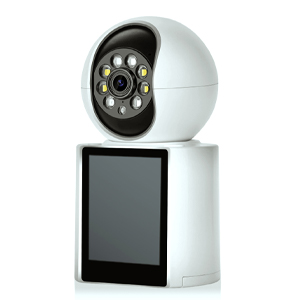
Dual-lens security cameras provide several advantages over traditional single-lens models. They offer a broader field of view, effectively covering larger spaces with a single device. This can save you money and time by reducing the need for multiple cameras. Additionally, dual-lens cameras typically include enhanced zoom capabilities, allowing you to focus on specific areas in greater detail without sacrificing overall coverage. This makes them particularly valuable in hallways or large living areas, where comprehensive monitoring is crucial.The INSEETECH 5MP WiFi Dual Lens indoor security camera is designed for easy installation, robust performance, and enhanced security. It can monitor two places at once: the upper camera can pan 350° and tilt 90°, and the lower one can fix to one place, ensuring comprehensive coverage of your indoor area.
When selecting an indoor security camera, consider features like motion detection, night vision, and audio capabilities. Dual-lens cameras, in particular, offer the benefit of wider coverage and detailed zoom, making them a versatile choice for any room.
Installing indoor security cameras in strategic locations enhances your home's safety and provides peace of mind. By following these guidelines and selecting the right camera for each room, you can ensure comprehensive protection for your home.
Copyright © 2023 INSEETECH LIMITED. All Rights Reserved.