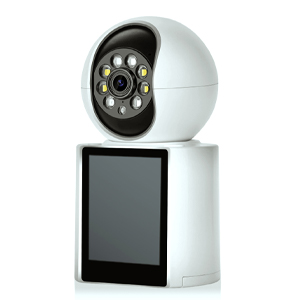
In today’s connected world, internet speed plays a crucial role in ensuring smooth performance for WiFi security cameras. Whether you're monitoring your home, office, or business, having a reliable and fast internet connection is essential for high-quality video streaming, real-time alerts, and remote access.
But how fast is 500 Mbps, and is it enough for your security camera setup? In this guide, we’ll break down internet speed requirements, explain how WiFi security cameras use bandwidth, and help you determine whether 500 Mbps is sufficient for your needs.
Before diving into security camera requirements, let’s clarify what Mbps (Megabits per second) means:
1 Mbps = 1,000 kilobits per second (Kbps)
1 Gbps = 1,000 Mbps
Internet speeds determine how quickly data transfers between your devices and the cloud. For security cameras, this affects:
✔ Video quality (HD, 4K, etc.)
✔ Live streaming smoothness
✔ Cloud storage upload speeds
✔ Multiple camera performance
WiFi security cameras consume varying amounts of bandwidth depending on:
Resolution (720p, 1080p, 4K)
Frame rate (15fps, 30fps, etc.)
Compression technology (H.264, H.265, etc.)
Continuous recording vs. motion-activated recording
| Resolution | Bitrate (Per Camera) |
|---|---|
| 720p (HD) | 1–2 Mbps |
| 1080p (Full HD) | 2–4 Mbps |
| 2K (QHD) | 4–6 Mbps |
| 4K (Ultra HD) | 10–20 Mbps |
If you have multiple cameras, multiply these numbers accordingly. For example:
4x 1080p cameras = ~8–16 Mbps
2x 4K cameras = ~20–40 Mbps
Absolutely! 500 Mbps is more than sufficient for most home and small business security setups. Here’s why:
✅ Supports multiple high-resolution cameras (even 4K) without lag.
✅ Allows smooth live streaming & remote viewing on multiple devices.
✅ Handles other internet activities (streaming, gaming, downloads) simultaneously.
✅ Future-proofs your network for additional smart home devices.
Basic Home Security (2–4 Cameras)
2x 1080p cameras (~8 Mbps) + streaming Netflix (~25 Mbps) = ~33 Mbps used (plenty left).
Advanced Setup (6+ Cameras + Smart Home)
6x 1080p cameras (~24 Mbps) + 4K streaming (~50 Mbps) + smart devices = ~100 Mbps used (still only 20% of 500 Mbps).
Business/High-Traffic Monitoring
10x 4K cameras (~200 Mbps) + office internet usage = ~300 Mbps used (still well within 500 Mbps).
Even with 500 Mbps, other factors can impact your security cameras:
🔹 WiFi Signal Strength – Weak signals cause buffering. Use mesh networks or WiFi extenders for better coverage.
🔹 Router Quality – Older routers may bottleneck speeds. Upgrade to a dual-band or tri-band router.
🔹 Upload Speed – Many ISPs offer asymmetric speeds (e.g., 500 Mbps download / 20 Mbps upload). Check if your upload speed meets camera needs.
🔹 Network Congestion – Too many devices can slow things down. Use QoS (Quality of Service) settings to prioritize cameras.
For most users, 500 Mbps is overkill just for WiFi security cameras—but it’s excellent if you have:
Multiple high-resolution cameras
Heavy internet usage (gaming, 4K streaming, etc.)
A smart home with many connected devices
If you only have 1–3 cameras, even 100–200 Mbps may suffice. However, 500 Mbps ensures smooth, lag-free performance with room to grow.
For casual users: 100–200 Mbps is enough.
For power users & businesses: 300–500 Mbps (or higher) is ideal.
By choosing the right speed and optimizing your network, you can ensure seamless, high-quality surveillance without interruptions.
What’s your experience with WiFi security cameras and internet speeds? Share your thoughts in the comments! 🚀
Copyright © 2023 INSEETECH LIMITED. All Rights Reserved.