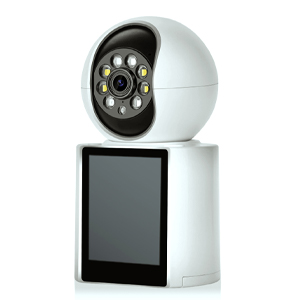
Halloween is evolving. The simple "boo!" from a jumpscare decoration is so last decade. Welcome to the era of the Tech-Infused Haunt, where your front porch becomes a stage for interactive, spine-tingling fun. And the best part? You're the director, hiding behind the scenes with your smartphone.
If you have a smart doorbell or a security camera with two-way talk, you're already holding the key. Let's transform your humble doorstep into a neighborhood legend.
Before we summon the spirits, let's ensure your tech is ready.
The Hardware: Any modern smart doorbell (Ring, Nest, Eufy, etc.) or an outdoor security camera with a speaker and microphone will work perfectly.
The Command Center: Your smartphone or tablet, with the corresponding app installed and fully updated. Ensure your device is charged and you have a strong Wi-Fi signal. This is your portal to the other side.
Now, let's get to the good stuff. Here are three levels of haunting to terrify and delight your trick-or-treaters.
This is the easiest way to add a layer of mystery. No extra apps or gadgets are needed.
The Disembodied Voice: As kids approach, use the two-way talk feature on your app. But don't speak in your normal voice!
Technique: Whisper mysteriously, speak in a low, gravelly monotone, or use a classic ghostly "Woooooo."
Script Ideas:
"I see you... I like your costume."
"The treats are yours... but are you brave enough to take them?"
"Leave the candy... take the soul." (For older kids, of course!)
The magic here is the disconnect. They hear a voice from a small device, but with no person in sight, it creates a wonderfully eerie moment.
This is where we introduce smart home automation. If you have a smart home hub like Amazon Alexa, Google Assistant, or Apple HomeKit, you can create a truly automated scare.
The Concept: The moment your camera detects motion, it automatically triggers a spooky sound or flickering smart lights.
How to Set It Up (Example with Alexa & Ring):
Open the Alexa app.
Go to Routines and tap + to create a new one.
When this happens, select Smart Home and choose your Ring Doorbell's Motion.
For the Add action, select Music & Podcasts and choose a pre-selected, creepy sound effect from Amazon Music or Spotify (e.g., a ghostly moan, a creaking door, or a witch's cackle).
You can add another action to control Smart Lights—make them flash red and orange or turn off completely for a few seconds.
Now, when a group of trick-or-treaters walks up, your porch comes alive with sound and light all on its own. It’s a guaranteed scream (of delight)!
This is the pinnacle of DIY tech haunts, combining voice, sound, and lighting for a full narrative experience.
What You'll Need:
Your smart camera.
A Bluetooth speaker (hidden near the door).
Smart bulbs (like Philips Hue, LIFX, or Wyze) in your porch light or nearby lamps.
A voice-changing app on your phone (many free options are available).
The Setup:
The Voice: Connect your phone to the hidden Bluetooth speaker. Open a voice-changing app and select an effect like "Demon," "Robot," or "Echo." Now, when you use your phone's microphone to speak through the app, your altered voice will boom from the hidden speaker, making it seem like the house itself is talking.
The Atmosphere: Create a separate smart home routine (as in Level 2) where motion detection sets your smart lights to a dim, eerie color like deep purple or green. This sets the stage before you even say a word.
The Performance: Watch the live feed from your camera. When a group arrives, use your demonic voice from the hidden speaker to engage them.
Interactive Script: "Ah, new visitors... To receive your candy, one of you must tell a scary story... [After they tell a story] ...A valiant effort. The treats are released! But beware what lurks in the shadows..." Then, remotely unlock a smart lock on a treat-filled box or simply tell them to take candy from a bowl.
Test, Test, Test: Do a full dress rehearsal before the big night. Check audio levels, light triggers, and Wi-Fi range.
Know Your Audience: For very young children, stick to a friendly ghost voice or skip the voice entirely, relying only on fun, non-scary automation.
Have a "Safe Word": If you see a child getting genuinely frightened, quickly switch to your normal, friendly voice and say, "Happy Halloween! Just kidding, grab some candy!"
Keep it Fun: The goal is spooky fun, not genuine terror. Read the room through your camera feed.
This Halloween, step out from behind the door and become the invisible haunt of your neighborhood. With a little tech and creativity, your home will be the one they remember for years to come.
Happy Haunting!
What are your plans? Share your own tech-haunt ideas in the comments below!
Copyright © 2023 INSEETECH LIMITED. All Rights Reserved.